


10.26" 4K Dash Cam Mirror with Wireless CarPlay & Android Auto, GPS, Rear Camera, 1600x600 IPS Touchscreen, Voice Control, Parking Monitor
With Front Camera / with 64G card
$149.99
Sale price
$149.99
Regular price
$103.33
Skip to product information


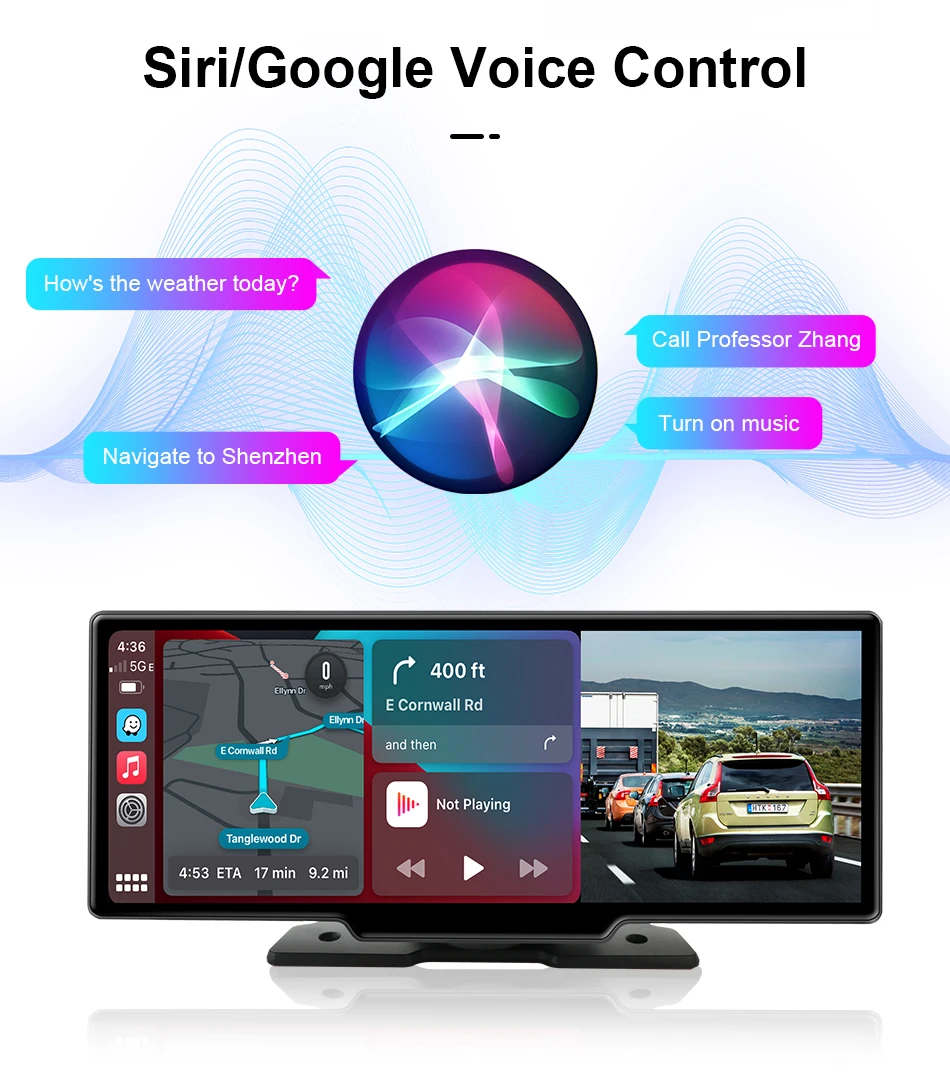
GPS Track Playback & GPS Navigation




10.26" 4K Dash Cam Mirror with Wireless CarPlay & Android Auto, GPS, Rear Camera, 1600x600 IPS Touchscreen, Voice Control, Parking Monitor
$149.99
Sale price
$149.99
Regular price
$103.33
Choose your option

With Front Camera / with 64G card
MOST POPULAR$149.99
With Front Camera / Without TF card
$129.99
$374.28

No Front Camera / Without TF card
$124.99
$345.84
No Front Camera / with 128G card
$159.99
$458.08
No Front Camera / with 64G card
$129.99
$373.12

10M Monitor Rear Cam / with 128G card
$179.99
$557.80

6M DVR Rear Cam GPS / with 64G card
$159.99
$492.80
10M Monitor Rear Cam / with 64G card
$157.99
$486.20
10M Monitor Rear Cam / Without TF card
$157.99
$447.32

6M Monitor Rear Cam / Without TF card
$149.99
$413.84
6M Monitor Rear Cam / with 128G card
$169.99
$535.40
With Front Camera / with 128G card
$159.99
$490.64
6M Monitor Rear Cam / with 64G card
$169.99
$511.12

10M DVR Rear Cam GPS / with 128G card
$209.99
$616.20
10M DVR Rear Cam GPS / with 64G card
$169.99
$533.36
10M DVR Rear Cam GPS / Without TF card
$164.99
$487.80
6M DVR Rear Cam GPS / Without TF card
$154.99
$454.68
6M DVR Rear Cam GPS / with 128G card
$185.99
$570.56
Your Purchase Is 100% Secure
Why Buy From G8 Central?
G8 Central offers quality products, affordable prices, exclusive deals, fast shipping, and dedicated customer support—making every shopping experience simple and reliable.
Description
🚗 Upgrade Your Drive with the Ultimate 10.26” 4K Smart Dash Cam Mirror (2025 Best Seller)
Transform your car into a smart driving hub with this 10.26” 4K Mirror Dash Cam & Wireless CarPlay/Android Auto Display. Designed for modern drivers, this sleek rearview mirror monitor combines 4K front recording, optional 1080P rear camera, GPS tracking, and hands-free voice control — all in one powerful device.
With over 8,000+ units sold in 2025, this trending smart car screen delivers safety, convenience, and next-level multimedia on every drive.
🌟 Why Drivers Love It
🎥 Ultra-Clear 4K Recording (Front Camera Version)
-
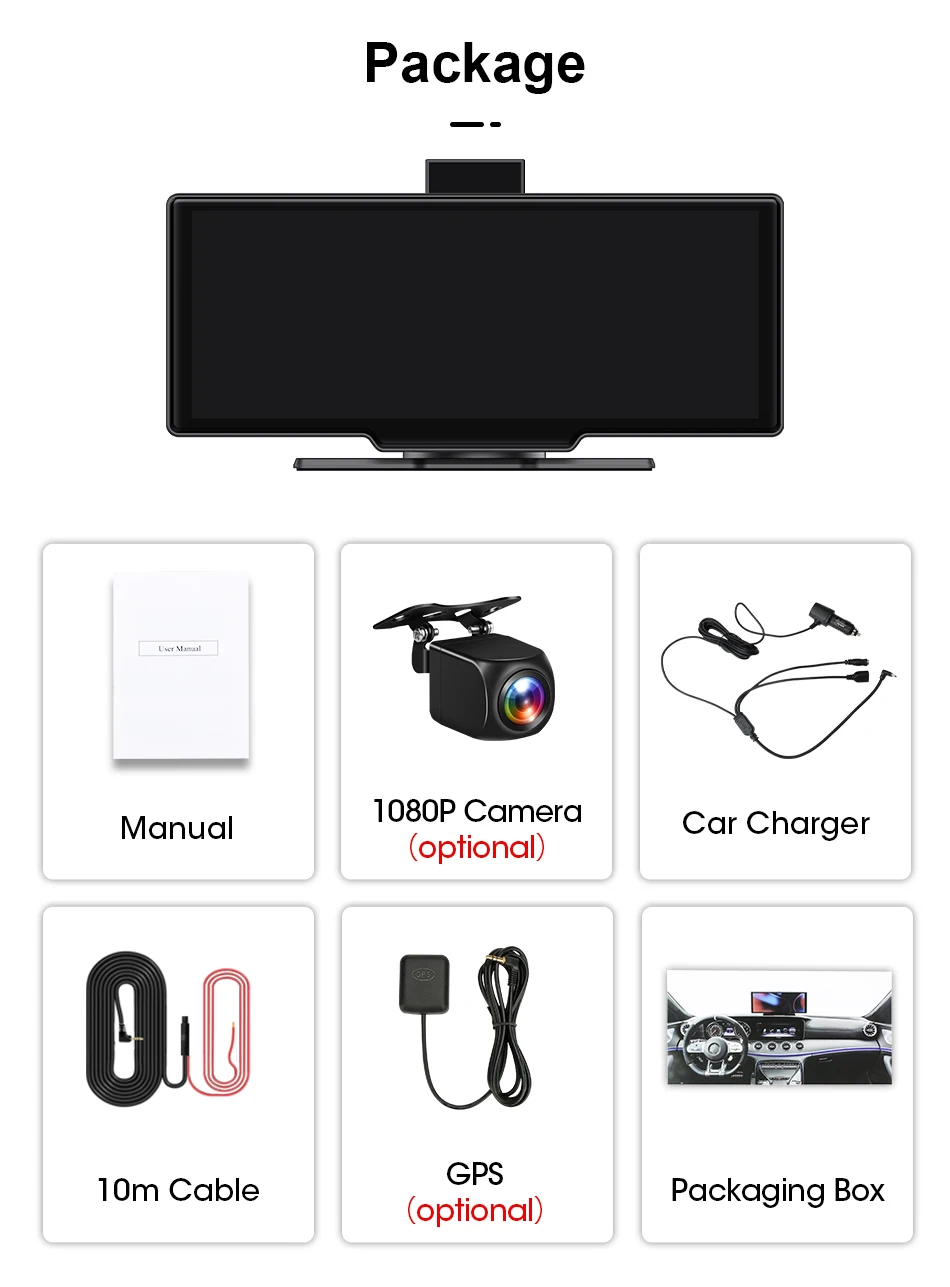
3840×2160P 4K front camera
-
Optional 1080P rear camera
-
Wide-angle coverage for full road visibility
-
Loop recording + G-Sensor for automatic incident saving
-
Supports up to 256GB SD card
Note: No-Front-Camera Version does not include DVR recording.
📱 Wireless CarPlay & Android Auto
-
Supports wireless & wired CarPlay and Android Auto
-
Mirror your navigation, calls, music & messages instantly
-
Also supports Apple AirPlay & Android Mirror
-
No app downloads required
⚠️ Please note: Android Auto may not support some Xiaomi, Huawei, and Samsung models.
🎙 Intelligent Voice Control (English Commands)
-
Hands-free voice recognition
-
Control music, navigation & calls safely
-
Reduces distraction while driving
-
Supports English voice commands only
🛰 Built-in GPS & Real-Time Monitoring
-
External GPS support for accurate route tracking
-
Parking monitor protection
-
Motion detection & real-time surveillance
-
Anti-vibration & anti-surge voltage protection
🔊 Multiple Audio Output Modes
-
Built-in speaker (SPK)
-
FM transmitter
-
AUX connection
-
Bluetooth 5.0
🖥 Premium 10.26” IPS Touchscreen Display
-
1600×600 IPS resolution
-
16:9 wide screen ratio
-
Crisp colors & clear visibility
-
Rearview mirror integrated design
Includes:
✔ Vertical mounting bracket
✔ Suction cup bracket (does not obstruct view)
📦 Choose Your Version
1️⃣ Front Camera Version
-
4K front DVR recording
-
Wireless & wired CarPlay/Android Auto
2️⃣ No Front Camera Version
-
No DVR recording
-
Wireless & wired CarPlay/Android Auto only
All models do NOT run Android OS and do not support app installation.
🌍 Language Support
-
English
-
Español
🔒 Built for Safety & Reliability
-
G-Sensor collision detection
-
Automatic white balance
-
Anti-vibration technology
-
Parking monitor protection
-
Real-time surveillance
🚘 The Smartest Car Screen Upgrade of 2025
If you're looking for:
✔ Bigger navigation screen
✔ Safer driving experience
✔ Wireless smartphone integration
✔ Front & rear protection recording
✔ Modern dashboard upgrade
This 10.26” 4K Mirror Dash Cam is the perfect all-in-one solution.
🛒 Upgrade Your Car Today
Drive smarter. Record safer. Stay connected — hands-free.
Limited stock available – join 8,000+ satisfied drivers now!


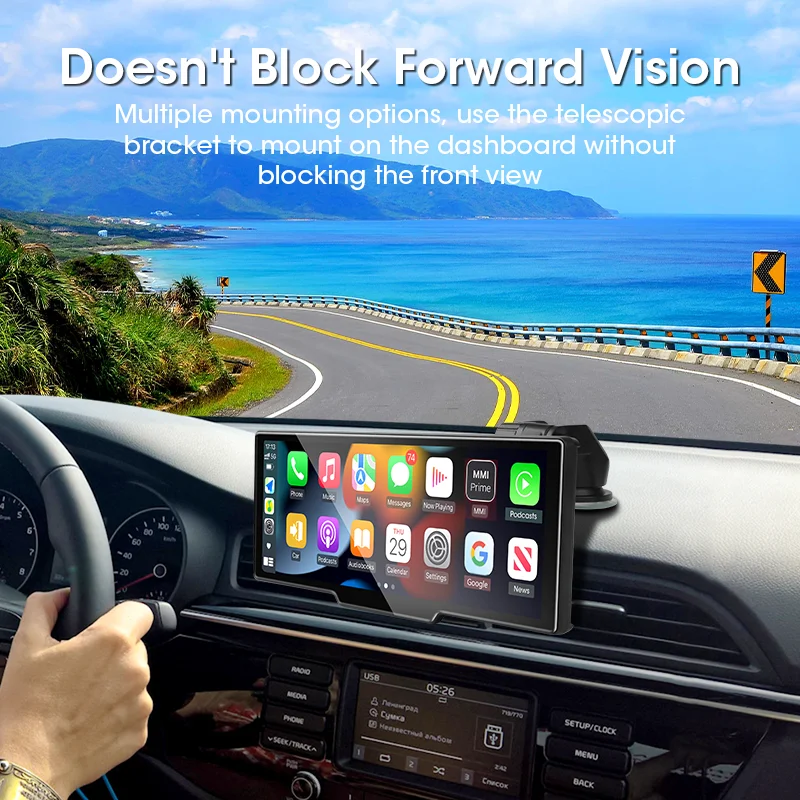
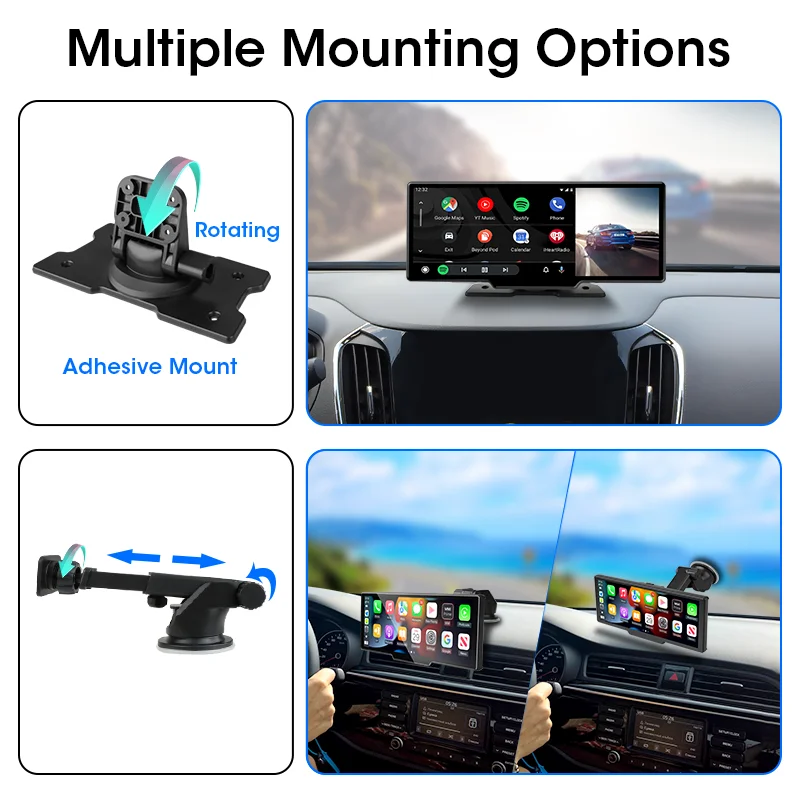


Wireless IOS Carplay & Android Auto


Dual Channel Recording( optional )
Front camera is 4K (3840*2160P) + Rear camera is 1080P
Dual Channel Recording( optional )
Front camera is 4K (3840*2160P) + Rear camera is 1080P

GPS Track Playback & GPS Navigation
Note: This function only needs to connect to our GPS Module!
Search for " GVPlayer ", download and install, and you can use it to play driving track history.
5G Hz WiFi & APP Connection
srnubi is built with the latest 5G Hz High-Speed WiFi. You can connect your mobile phone through the WIFI APP.
You can view images in real time and quickly download videos and pictures recorded by the DVR.

srnubi is built with the latest 5G Hz High-Speed WiFi. You can connect your mobile phone through the WIFI APP.
You can view images in real time and quickly download videos and pictures recorded by the DVR.
Support FM / AUX / SPK / Bluetooth 5.0
Srnubi Added Bluetooth output audio to the car audio system. Bluetooth output audio is more stable and has better sound quality. If your car is not using AUX audio well, you can change it to Bluetooth output audio.
Srnubi Added Bluetooth output audio to the car audio system. Bluetooth output audio is more stable and has better sound quality. If your car is not using AUX audio well, you can change it to Bluetooth output audio.
When you use AUX cable to output audio to the car audio system, you need to select AUX mode. Otherwise, it will have no sound
(Package includes AUX cable)


Support Wireless Apple airplay/Android mirror

Supports 4 display modes
1. Large screen CarPlay & Android Auto view. / 2. Split screen Carplay mode+reverse camera view
3. Large screen front camera view / 4. Split-screen front camera+reverse camera view

Real-time Reversing View
When reversing, the system will automatically turn on the rear high-definition reversing camera.


(Package includes AUX cable)
Support Wireless Apple airplay/Android mirror
Supports 4 display modes
1. Large screen CarPlay & Android Auto view. / 2. Split screen Carplay mode+reverse camera view
3. Large screen front camera view / 4. Split-screen front camera+reverse camera view
Real-time Reversing View
When reversing, the system will automatically turn on the rear high-definition reversing camera.
Loop Recording
Automatically overwrite the previous recordings with new files except locked files when the memory card is full.


T80 version 2 in 1: DVR recording + Carplay/Android Auto
1. DVR record: There is a front-facing camera on the mirror. The rear-view camera is optional. The front camera is 4K: 3840 * 2160P, and the rear view camera is 1080P.
2. CarPlay/Android Auto: In CarPlay mode, you can use some of the app functions on your phone. For example, navigation apps and music apps.
Please note that:
1. The DVR mirror itself does not have an Android system. It cannot download apps.
2. 4K refers to the video recorded by the front camera being 4K. The resolution of the display screen is 1600 * 600
3. 10.26 inches is the size of the entire mirror glass. The display screen measures approximately 9.3 inches. It is a rough size.
4. Android Auto does not support Huawei phones. Because Huawei's mobile phone system is not an Android system.
FAQ:
1.Is this device suitable for my car?
This is a 10.26" universal car radio, just fix it on the center console.
2. How to connect wireless CarPlay/Android Auto?
First, pair the mobile phone with Bluetooth, and then it will automatically connect to the WIFI signal. After both are connected, CarPlay/Android Auto will automatically jump to the corresponding interface.
3. Why Android Auto Connection Exception?
(1)Please confirm that your phone is Android version 8.0 or above, and download the latest version of Android Auto.
(2) If your Android Auto software has been connected to other vehicles before, please delete the relevant information on the software page.
(3)Check whether the following 3 software are the latest versions. Google.Google Maps, Speech Services by Google.
4. How to connect a wired Android Auto?
It can be connected through the mobile phone data cable. Please use the original car cable for data transmission.
5. Is it possible to transmit audio to the car's speakers via Bluetooth?
Yes, when you connect Android Auto or CarPlay, you can also use the car's Bluetooth to listen to music directly.
6. How to sync sound via FM?
Select the FM audio transmitter on the device, set the car radio's channel to a blank station, and tune the device's radio to the same frequency as the car radio; the setting is complete.
7. How to sync sound via AUX cable?
Find the AUX cable, then connect one end of the cable to the "audio" port on the slide right of the device, connect the other end to the AUX-IN port on the car, and enter the AUX playback interface of the car radio to synchronize the sound - Set up.
8.Why is my reverse camera not working/showing blue screen/unable to display?
Please confirm that you have selected the model that includes our original backup camera. This product only supports our original backup camera and does not support the original car backup camera or cameras from other brands.
9.Why is it hot behind the machine?
This device uses powerful chips, so the power consumption is higher. There are heat dissipation holes on the back panel of the device, and heating is anormal heat dissipation phenomenon.
10.Why android auto can't answer calls through car vehicle Bluetooth?
Setting up blocking phone permissions in mobile app-android auto.
Shipping Information
Shipping & Delivery
Order Cut-Off Time: 10:00 AM (Pacific Time), Monday–Friday
Handling Time: 1–2 business days (Monday–Friday)
Estimated Transit Time: 3–4 business days (Monday–Friday)
Returns & Refunds:
We offer a 30-day return and refund policy. For complete details, please visit our Returns & Refund Policy page.
You may also like
Same Day shipping
Everything we do starts with why
30 day money back guarantee
We believe in building better
Returns accepted
Real people making great products